# How I Cut 80%+ of Context Overhead in My Coding Agent
> Most AI coding harnesses dump dozens of tool definitions into the prompt on turn zero. Here is how I designed a dynamic tool activation engine for Pi that keeps the agent lean, cuts 80%+ of baseline context overhead, and auto-cleans on idle.
*Mohammed Reschreiter · 2026-08-27*
Tags: AI Agents, Coding Harness, Architecture, Pi, Context Optimization
---
When you start a session in a modern AI coding agent, a huge chunk of your context window is consumed before you type your first message.
Between system instructions, formatting rules, MCP server integrations, and dozens of registered tool schemas, most agent harnesses dump 10,000 to 25,000+ tokens of static overhead into the context window on every turn.
On 90% of turns, an agent only needs basic file and shell tools (`read`, `bash`, `edit`, `write`). Specialized tools like browser automation, image generation, web search, or background task runners are needed occasionally, sometimes only once a week.
Leaving 25 to 80+ tool definitions active in the LLM function schema 100% of the time wastes tokens, increases latency, and degrades model reasoning by polluting the attention space with irrelevant parameters.
I solved this with two design decisions:
1. **Action-based tool consolidation.** Structuring custom tools from day one to avoid CRUD schema duplication.
2. **Dynamic tool activation in Pi.** Keeping a baseline of 4 tools active, placing everything else on standby, and letting the model or the user activate tools on demand with zero meta-tool schema overhead and automatic TTL cleanup.
---
## Benchmarking turn zero context across agent harnesses
To measure the scale of the problem, I tested how different coding agent harnesses handle tool schemas and context on a fresh session by sending a single greeting: `"hi"`.
### 1. Codex: 79 tools and 14.5k tokens by default
I turned off every external plugin and MCP server in Codex, leaving only two custom skills alongside the default built-in setup. Then, I started a fresh session and sent `"hi"`.
The model answered with a standard one-line greeting ("Hi! How can I help?"). The thread status showed that the session had already consumed **14,534 tokens** (6% of the 258k context window gone on turn zero).
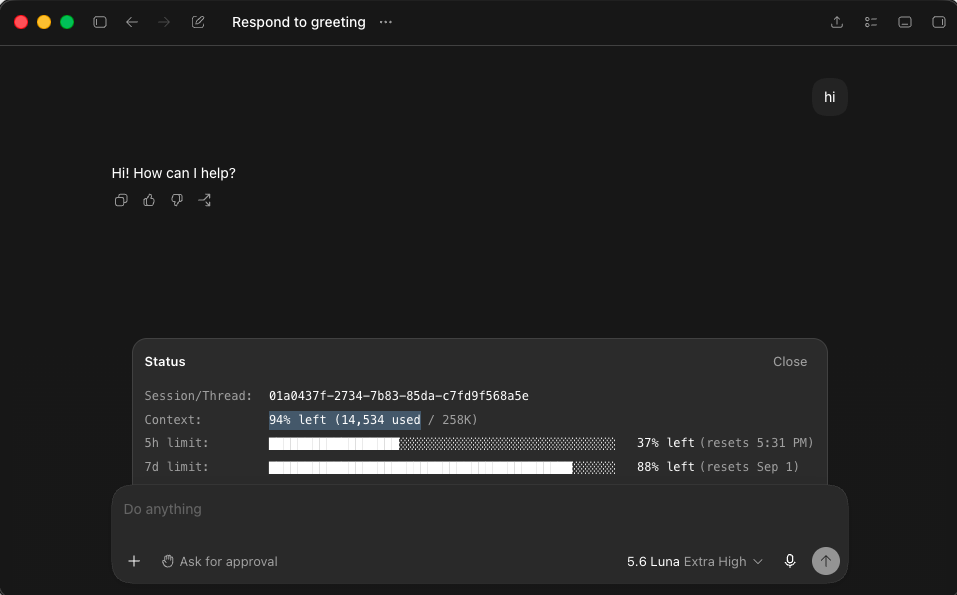
*Figure 1: Codex context consumption after sending a single "hi". 14,534 tokens consumed before any actual work begins.*
When I asked the agent which tools were currently active and callable, it returned **79 active tools**.
Click to view the full list of 79 active tools loaded in Codex
```text
apply_patch
codex_app__automation_update
codex_app__create_thread
codex_app__fork_thread
codex_app__get_handoff_status
codex_app__handoff_thread
codex_app__list_archived_threads
codex_app__list_projects
codex_app__list_threads
codex_app__load_workspace_dependencies
codex_app__navigate_to_codex_page
codex_app__open_in_codex
codex_app__read_thread
codex_app__read_thread_terminal
codex_app__send_message_to_thread
codex_app__set_thread_archived
codex_app__set_thread_pinned
codex_app__set_thread_title
codex_app__share_thread
codex_app__wait_threads
create_goal
exec_command
get_goal
image_gen__imagegen
list_available_plugins_to_install
list_mcp_resource_templates
list_mcp_resources
mcp__codex_apps__codex_document_control_execute_document_command
mcp__codex_apps__codex_document_control_get_document_tool_schemas
mcp__codex_apps__codex_document_control_list_document_sessions
mcp__codex_apps__plugin_management_get_app_permissions
mcp__codex_apps__plugin_management_get_plugin_dependencies
mcp__codex_apps__plugin_management_uninstall_app
mcp__codex_apps__plugin_management_update_app_permissions
mcp__codex_apps__safety_settings_get_family_info
mcp__codex_apps__safety_settings_get_parental_controls
mcp__codex_apps__safety_settings_get_trusted_contact
mcp__codex_apps__safety_settings_prepare_parental_control_update
mcp__codex_apps__safety_settings_update_parental_control
mcp__codex_apps__sites_add_custom_domain
mcp__codex_apps__sites_change_site_slug
mcp__codex_apps__sites_create_site
mcp__codex_apps__sites_create_source_repository_write_credential
mcp__codex_apps__sites_deploy_private_site_version
mcp__codex_apps__sites_deploy_site_version
mcp__codex_apps__sites_generate_siwc_bypass_token
mcp__codex_apps__sites_get_deployment_status
mcp__codex_apps__sites_get_environment_variables
mcp__codex_apps__sites_get_site
mcp__codex_apps__sites_get_site_version
mcp__codex_apps__sites_get_site_worker_logs
mcp__codex_apps__sites_list_custom_domains
mcp__codex_apps__sites_list_site_versions
mcp__codex_apps__sites_list_sites
mcp__codex_apps__sites_read_database_overview
mcp__codex_apps__sites_read_database_table_rows
mcp__codex_apps__sites_refresh_custom_domain_status
mcp__codex_apps__sites_remove_custom_domain
mcp__codex_apps__sites_save_site_version
mcp__codex_apps__sites_update_environment_variables
mcp__codex_apps__sites_update_site_access
mcp__codex_apps__sites_update_site_metadata
mcp__node_repl__js
mcp__node_repl__js_add_node_module_dir
mcp__node_repl__js_reset
multi_agent_v1__close_agent
multi_agent_v1__resume_agent
multi_agent_v1__send_input
multi_agent_v1__spawn_agent
multi_agent_v1__wait_agent
plugin_management__uninstall_plugin
read_mcp_resource
request_permissions
request_plugin_install
update_goal
update_plan
view_image
web__run
write_stdin
```
If you enable just one or two extra plugins, such as security scanners or GPT apps, the active tool list passes 100 callable tools.
---
### 2. Gemini and Antigravity: fewer tools, still 19.9k tokens
You might assume that keeping the tool list shorter avoids context bloat. The Antigravity CLI (`agy`) with Gemini 3.7 Flash shows that tool count alone is not the whole story.
I ran the exact same test: I opened a fresh session and sent `"hi"`.
The response was a single line ("Hello! How can I help you with your project today?"). The telemetry reported that **19.9k tokens** were consumed immediately on turn zero, with **13.8k tokens** taken up by tool schemas alone.
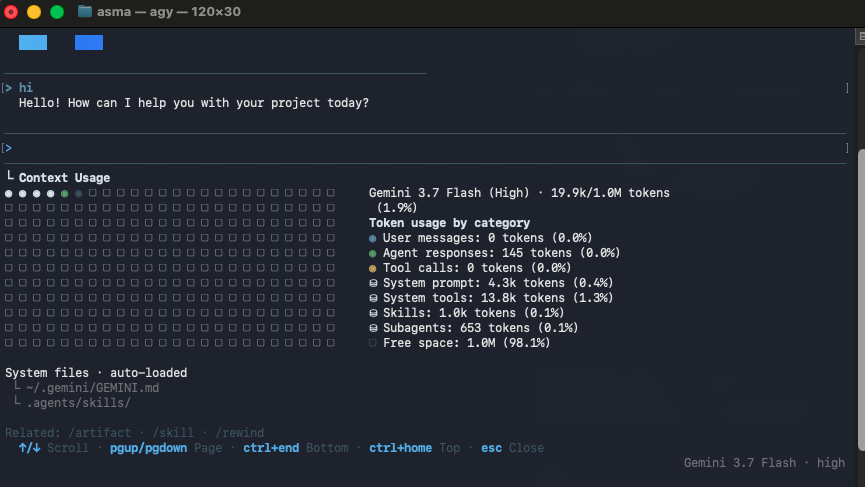
*Figure 2: Antigravity CLI context breakdown after sending a single "hi". 13.8k tokens consumed by tool schemas alone.*
Antigravity had only 17 tools active, not 79. Yet its tool schemas consumed **13.8k tokens** by themselves.
Click to view the 17 active tools in Antigravity
```text
1. run_command
2. manage_task
3. schedule
4. define_subagent
5. invoke_subagent
6. manage_subagents
7. send_message
8. write_to_file
9. replace_file_content
10. view_file
11. list_dir
12. grep_search
13. find_by_name
14. search_web
15. read_url_content
16. generate_image
17. ask_question
```
#### The redundancy problem
Why create dedicated LLM tools for `list_dir`, `grep_search`, and `find_by_name` when the agent already has `run_command` (native bash)?
An agent with bash access runs `ls`, `grep`, `rg`, or `find` directly. Building separate function schemas for basic shell operations duplicates capabilities the model already has, while adding thousands of tokens of JSON schema definitions, parameter documentation, and edge-case instructions to every turn.
---
### 3. Claude Code: built-in baseline and the MCP dilemma
Anthropic recognized this problem in Claude Code and introduced *Deferred Tool Loading*.
Out of the box without any MCP servers, Claude Code maintains a baseline of around 8 to 10 built-in tools (`Bash`, `View`/`Read`, `Edit`, `Replace`, `Glob`, `Grep`, `Agent`, `WebSearch`, `NotebookEdit`). Combined with system prompts and project instructions, turn zero consumption sits around **3,500 to 5,000+ tokens**.
When developers connect multiple MCP servers for databases, issue trackers, or browser automation, the tool registry passes **30 to 40+ tools**, pushing the tool schema payload alone to **over 10,000 to 14,000+ tokens** per turn.
To handle this, Claude Code splits tools into two tiers when deferrable definitions exceed 10% of the context window:
1. **Always Loaded:** Core file and search tools plus infrastructure (`Bash`, `Read`, `Edit`, `Write`, `Glob`, `Grep`, `Agent`, `ToolSearch`, `Skill`).
2. **Deferred (Name-only):** `WebSearch`, `NotebookEdit`, cron automation tools, and all connected MCP extension tools.
```text
Always Loaded:
Bash, Read, Edit, Write, Glob, Grep, Agent, ToolSearch, Skill
Deferred (Names only until fetched):
WebSearch, TodoWrite, NotebookEdit, CronCreate, MCP servers...
```
While deferred loading reduces turn zero bloat when many MCPs are active, its discovery mechanism relies on an LLM meta-tool (`ToolSearch`):
- When the model needs a deferred tool, it must first execute `ToolSearch("select:ToolName")`.
- The backend injects the full schema into the context, and only on the following turn can the model execute the tool.
- To prevent the model from forgetting loaded tools during context compaction, the runtime maintains custom boundary metadata and compaction recovery logic.
- Even in its minimal state, Claude Code keeps 9 tools permanently loaded (including redundant search tools and the `ToolSearch` meta-tool itself), maintaining a baseline overhead of several thousand tokens.
*Note on Claude Code numbers: Because I do not use Claude Code personally, these figures are based on technical analyses, telemetry shared by other engineers, and community discussions online. I used the lower-bound estimates reported by active users across standard setups.
---
## Why turn zero overhead degrades agent performance
This design pattern across modern harnesses creates two problems:
1. **Token cost and context exhaustion.** Burning 14k to 20k tokens on turn zero means you hit context limits and rate quotas faster. Over a multi-turn session with long reasoning chains, you re-send those 17 to 80+ tool schemas on every single request.
2. **Attention dilution and tool confusion.** Models perform best when their decision space is focused. When an LLM sees dozens of similar tools (multiple thread management endpoints, site deployment tools, multi-agent spawners, duplicate search utilities), it burns reasoning capacity sifting through irrelevant options and is more prone to parameter hallucinations or picking the wrong tool.
---
## Principle 1: action consolidation instead of CRUD APIs
Cutting context bloat does not start with runtime tricks. It starts with how you design individual tools from day one.
In traditional software engineering, REST and CRUD principles encourage creating granular endpoints for every verb:
- `memory_read`
- `memory_write`
- `memory_update`
- `memory_delete`
This makes sense for HTTP APIs because registering an extra endpoint in code has zero runtime payload cost until a client makes a request.
For AI agents, that assumption fails completely. **Every tool schema is sent across the wire and loaded into the LLM context window on every turn.** Four separate CRUD tools mean four JSON headers, four descriptions, four parameter objects, and four entries crowding the model's decision space.
### Action-based tool consolidation
When I design custom tools for agents, I consolidate operations by intent. For memory, I split the interface into at most two tools:
1. `memory_read`: Handles semantic search, keyword lookup, and fetching specific memories.
2. `memory_write`: Handles storing new memories, updating existing entries, and deleting memories by passing an `action` parameter (`"create" | "update" | "delete"`).
```json
{
"name": "memory_write",
"description": "Create, update, or delete entries in agent memory.",
"parameters": {
"type": "object",
"properties": {
"action": {
"type": "string",
"enum": ["create", "update", "delete"],
"description": "The mutation action to perform."
},
"id": {
"type": "string",
"description": "Memory ID (required for update or delete)."
},
"content": {
"type": "string",
"description": "Memory content (required for create or update)."
}
},
"required": ["action"]
}
}
```
The schema for `memory_write` is only about 15% to 20% larger than a single `memory_create` schema, but it replaces three separate tool definitions with one. You cut the schema footprint by 50% without losing any functionality.
If I want to be even more aggressive with token efficiency, I collapse all memory interactions into a single `memory` tool with an `action` enum (`search`, `fetch`, `create`, `update`, `delete`).
Modern LLMs handle action-parameterized tools reliably. I have run tools structured this way for months across diverse tasks, and the models pick the correct action without hesitation.
These architectural savings take effect **before** dynamic tool activation or prompt injection ever touches the system.
---
## Principle 2: dynamic tool activation in Pi
### Lessons from denkr.ai
I ran into this exact bottleneck months ago when building my mobile app, [denkr.ai](https://denkr.ai).
On mobile workflows, context bloat directly degrades latency and unit economics. I built an early variation of dynamic tool routing in Denkr, loading tools contextually based on intent. It proved that models have no issue activating tools when they need them, provided the instructions are clear and the interface is frictionless.
When I switched to Pi as my daily coding agent, I wanted the same lean setup. Because Pi is open source and gives developers full control over runtime lifecycle hooks, building this was straightforward.
### How dynamic tool activation works
The extension (`dynamic-tools`) operates on four core mechanics:
1. A hard default of 4 active tools (`read`, `bash`, `edit`, `write`).
2. Standby tool registration with zero-schema prompt injection.
3. In-process bash interception for activation (`pi-tool`).
4. Co-activation groups and automatic TTL pruning.
```
+-------------------------------------------------------------+
| User Prompt |
+-------------------------------------------------------------+
|
v
+-------------------------------------------------------------+
| Pi Hook: before_agent_start |
| - Active tools set to: read, bash, edit, write |
| - Injects minimal Markdown standby tool list into prompt |
+-------------------------------------------------------------+
|
v
+-------------------------------------------------------------+
| LLM decides to use a standby tool |
| Runs bash: pi-tool activate browser_use |
+-------------------------------------------------------------+
|
v
+-------------------------------------------------------------+
| Pi Hook: tool_call |
| - Intercepts bash command in-process |
| - Calls pi.setActiveTools([...defaults, ...browserTools]) |
| - Rewrites bash command to safe stdout echo |
+-------------------------------------------------------------+
|
v
+-------------------------------------------------------------+
| Pi Hook: agent_settled |
| - Decrements run TTL on non-default tools |
| - Automatically purges expired tools back to 4 defaults |
+-------------------------------------------------------------+
```
---
## Technical mechanisms under the hood
### 1. Minimal default baseline (4 core tools)
At startup, the extension forces Pi's active tool schema to only 4 tools:
```typescript
const DEFAULT_CONFIG = {
defaultTools: ["read", "bash", "edit", "write"],
groups: {
web_search: ["web_search", "web_fetch"],
browser_use: [
"browser_open",
"browser_observe",
"browser_preview",
"browser_diagnostics",
"browser_act",
"browser_wait",
],
loops: ["loops_report", "loops_create_definition", "loops_create_job", "loops_inspect"],
},
autoResetOnSessionStart: true,
toolTtlRuns: 2,
};
```
Any extension registered in Pi (via plugins, MCP, or local scripts) is loaded by Pi internally, but excluded from the active LLM schema using `pi.setActiveTools(...)`.
### 2. Zero-schema overhead: prompt injection instead of meta-tools
A common mistake when building tool managers is creating a dedicated LLM meta-tool (like `activate_tool({ name: string })`).
Adding a meta-tool adds its own JSON schema overhead, parameter documentation, and function-calling indirection.
Instead, I use Pi's `before_agent_start` hook to append a plain, lightweight Markdown summary to the system prompt:
```typescript
pi.on("before_agent_start", async (event, _ctx) => {
await loadConfig();
applyActiveTools();
const standby = getStandbyTools();
if (standby.length === 0) return;
const standbyLines = standby.map((name) => {
const group = findGroupForTool(name, config.groups);
return group ? `- \`${name}\` (part of group: **${group}**)` : `- \`${name}\``;
});
const injection = [
"## Dynamic Tool Activation",
`Default active tools: ${config.defaultTools.map((t) => `\`${t}\``).join(", ")}.`,
"Standby tools (not currently in your active schema):",
...standbyLines,
"",
"To activate a tool or group, run in bash: `pi-tool activate `",
].join("\n");
return {
systemPrompt: `${event.systemPrompt}\n${injection}`,
};
});
```
A raw text list of 20 tool names takes around 100 tokens. In contrast, 20 JSON tool schemas with parameters, types, and descriptions consume 4,000 to 10,000 tokens.
### 3. In-process bash interception
Since the agent already has `bash` enabled by default, it does not need a new tool to activate others. It simply runs:
```bash
pi-tool activate browser_use
```
The extension intercepts the bash call directly inside the Node.js process using `pi.on("tool_call")`:
```typescript
pi.on("tool_call", async (event, _ctx) => {
if (event.toolName !== "bash") return;
const command = event.input?.command;
if (typeof command !== "string") return;
const piToolMatch = command.trim().match(/^(?:pi-tools?|activate-tool)(?:\s+(.*))?$/i);
if (!piToolMatch) return;
// Activate the tools in memory
const result = activateTools(targetArgs);
const outputMessage = `[dynamic-tools] Activated tool(s): ${result.activated.join(", ")}`;
// Rewrite command on the fly so bash executes an immediate echo with exit code 0
const escaped = JSON.stringify(outputMessage);
event.input.command = `node -e 'console.log(${escaped})'`;
});
```
There is no separate CLI binary installed on the host machine. Pi catches the call, updates `pi.setActiveTools()`, rewrites the shell command to output the confirmation string, and returns cleanly to the model. On the next turn, the activated tools are in the JSON schema.
### 4. Co-activation groups
Tools rarely exist in isolation. When the agent needs browser automation, it needs navigation, observation, and action tools together (`browser_open`, `browser_observe`, `browser_act`, `browser_wait`).
Grouping them in `config.json` allows a single call like `pi-tool activate browser_use` (or activating any single tool inside that group) to bring in the entire bundle at once.
### 5. Automatic TTL pruning
Once a specialized task is finished, those extra tools should not linger in the prompt for the rest of the day.
The extension assigns a Time-To-Live (TTL) counter (default: 2 runs) to every activated standby tool.
```typescript
pi.on("agent_settled", async (_event, _ctx) => {
let changed = false;
for (const [tool, ttl] of Array.from(toolTtlMap.entries())) {
const nextTtl = ttl - 1;
if (nextTtl <= 0) {
activeToolNames.delete(tool);
toolTtlMap.delete(tool);
changed = true;
} else {
toolTtlMap.set(tool, nextTtl);
}
}
if (changed) {
applyActiveTools();
}
});
```
If the agent executes an activated tool during a turn, its TTL refreshes. When the agent returns to standard coding tasks and leaves the tool idle for 2 turns, the tool expires and context snaps back to the lean 4-tool baseline.
### 6. Real-world telemetry in CircaCode
Here is what this looks like on a fresh turn zero greeting (`"hi"`):
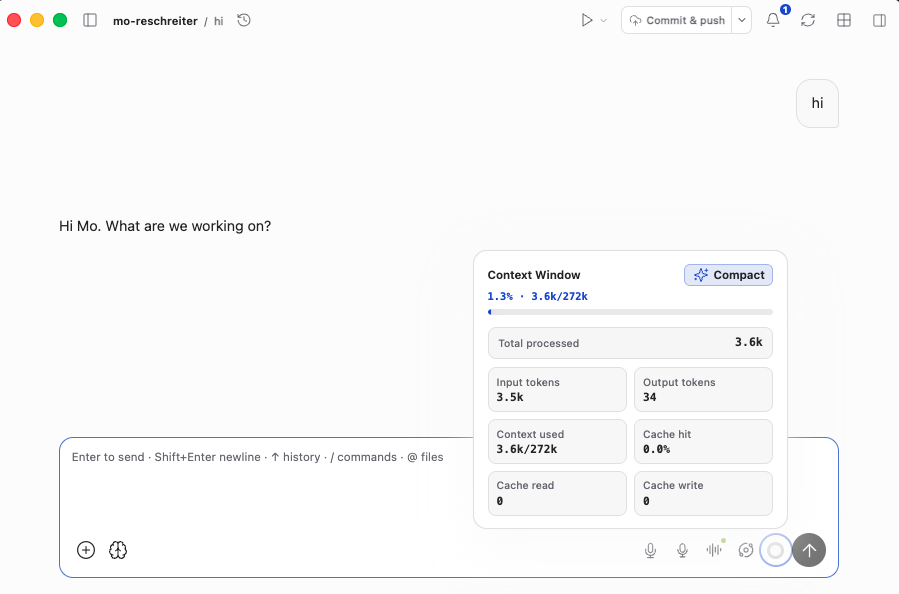
*Figure 3: Turn zero context consumption in Pi running inside CircaCode. Only 3.6k tokens processed (3.5k input tokens, 1.3% of the 272k window), including system prompt, persona, skills, and dynamic standby hints.*
*Note: This image was captured from inside my desktop application, **CircaCode**, which runs Pi as its agent engine.*
### 7. Interactive user slash commands
For human control, the extension registers native slash commands:
- `/activate-tool `
- `/deactivate-tool `
- `/tool list`
- `/tool reset`
These include auto-completion and interactive terminal select menus (`ctx.ui.select`), giving both the human and the agent equal control over the active workspace.
---
## Side-by-side comparison
Here is how all four coding agent environments compare when sending a single `"hi"` on turn zero:
| Agent Harness | Default Active Tools | Turn 0 Baseline Context Consumed | Tool Activation Mechanism |
| :--- | :--- | :--- | :--- |
| **Codex** | **79 tools** (100+ with plugins) | **14,534 tokens** (6.0% of 258k) | Static (all tools always active in schema) |
| **Antigravity (Gemini 3.7)** | **17 tools** | **19,900 tokens** (13.8k tools alone) | Static (all tools always active in schema) |
| **Claude Code\*** | **8–10 built-in** (30–40+ with MCP) | **~3,500 – 14,000+ tokens** | Meta-tool (`ToolSearch` round-trip for deferred tools) |
| **Pi + Dynamic Tools** | **4 core tools** (`read`, `bash`, `edit`, `write`) | **3,600 tokens** (1.3% of 272k) | In-process bash interception + auto-TTL |
*Claude Code numbers represent conservative estimates reported by developers and technical documentation online, rather than personal benchmarks.
---
## Results and takeaways
| Metric | Static Tools Baseline (Codex / Antigravity) | Pi + Dynamic Tool Activation | Reduction |
| :--- | :--- | :--- | :--- |
| **Turn 0 Context Overhead** | 14,500 – 19,900 tokens | **3,600 tokens** | **-75% to -82%** |
| **Active Schema Tools** | 17 – 79+ tools | **4 core tools** | **-76% to -95%** |
| **Tool Selection Reliability** | Susceptible to schema hallucinations | High precision | Clean decision space |
### 1. Preserving model intelligence and attention
LLMs are sharper when their context window is clean. As the context window fills past 40% to 50% capacity, attention degrades. Models miss subtle instructions, make syntax errors, and produce more tool hallucinations.
Starting every session with 15k to 20k tokens of static tool schemas eats directly into that high-performance zone. By keeping turn zero at 3.6k tokens, the model stays in its sharpest reasoning state for much longer during complex coding sessions.
### 2. Building and connecting tools without context anxiety
Before dynamic activation, adding a new tool was an architectural compromise. Every new tool meant asking: *"Is this feature useful enough to justify permanently adding 500 tokens of JSON schema to every single prompt for the rest of time?"*
With dynamic activation, that penalty disappears. I can build, connect, and experiment with whatever tools and extensions I want, including browser automation, background task loops, scrapers, voice synthesis, or custom database utilities.
When a tool is on standby, it does not load a JSON schema. It costs a single line of plain text in the standby hints list (about 5 to 10 tokens). I get an extensive tool ecosystem without paying the context tax on turns where I just need to edit a file.
### 3. Open agent runtimes win
Harnesses that treat the LLM context as an open, hackable runtime make this kind of optimization possible. Having direct access to lifecycle hooks (`before_agent_start`, `tool_call`, `agent_settled`) lets you tailor the agent environment to your actual workflow instead of being locked into a rigid, static tool schema.